Text communication

Talking using keyboards and spelling

2 Hit Keyboard Neil Fitzgerald

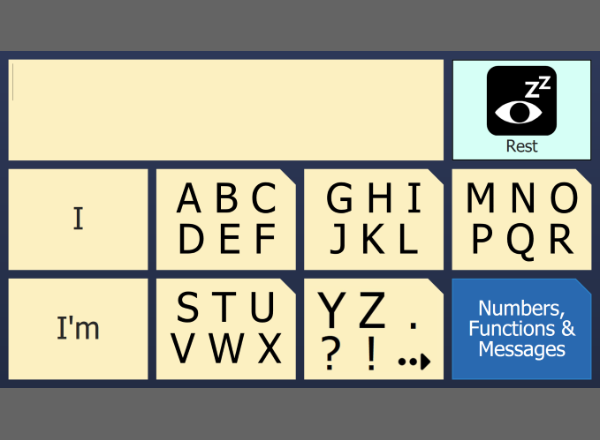
A simple 2 hit keyboard for Grid Player with prediction 

9 Cell Star Talker Sensory Software

The 9 cell access is helpful to people who work more easily with a small number of cells. For an eye gaze user or a touch screen user, this simply means fewer and larger cells. For a switch user, scanning a grid of 9 cells twice gives access to 81 cells in a much shorter scanning time. The StarTalker functions are all included: text communication, email, SMS, web browsing, word processing, media player and address book. 

alien reverberation EISLT

Gary the Alien welcomes you to Alien Reverberatiion for The Grid 

Animal Matching EISLT

Animal Matching is a simple game where the user has to match the picture to one of the three choices below. Folly Farm grids are a group of grid sets that contain some simple educational games. They are mainly designed to help motivate the user, so they can get use to their form of access may it be switch, eye gaze, head pointer or direct access. Please feel free to edit this grid set so that you have pictures and sounds in the grid that will motivate the user. Anything from pictures of their friends and family; to their favorite football team. Pictures have been kindly supplied by Folly Farm in Pembrokeshire which has a friendly farmyard, zoo, vintage funfair and an imaginative range of adventure play. For more details please go to http://www.folly-farm.co.uk/ These grid sets will only work with version 2.0.4 and above. 

Assessment Keyboards Gemma Eardley

A grid bundle of a variety of different keyboards to help people assess which keyboard the user would prefer. In here is ABC keyboards, Frequency keyboards for touch screen and switch users, QWERTY keyboards, and a two hit 6 cell and 8 cell grid. 

Autocomplete and touchtype Sensory Software

These are the grids used in the YouTube video about the new AutoComplete and TouchType features in The Grid 2.7. You can view the video here: http://www.youtube.com/watch?v=cUJJItIMGQE 

Chat Phrases Adam Waits

A chat keyboard with prediction and some phrase banks. The phrases are organised into a small selection of catagories, most of which have some pre-programmed phrases. phrases can be added and editted by the by the user. 

Chat Phrases - ABC Gemma Eardley

A simple Chat user with an onscreen ABC keyboard and message banks with some common prestore messages. We have only used 6 of the available 10 message lists so there are spaces to add in your own. 

Fast Talker Sensory Software

Fast Talker is a new text communication system for use with The Grid 2. It features our Touch Type text input system that works in a similar way to mobile phone. Fast Talker is suitable for use with literate users and is a very good option for those with access issues and eye gaze users. The grids include a Grid 2 Apps including a music player, email, SMS, Skype and our new web browser. Please note this version of Fast Talker was updated in June 2011 and includes Facebook grids. 

Fast talker 15 cell Sensory Software

Fast Talker 15 cell uses our Touch Type prediction system for typing that works in a similar way to mobile phone predictive text. Music player and word processor are also included. The 15 cell version provides faster text entry for users able to access an increased number of cells. 

Fast talker 9 cell Sensory Software

Fast Talker 9 cell uses our Touch Type prediction system for typing that works in a similar way to mobile phone predictive text. Music player and word processor are also included. 

handwriting chat Adam Waits

This grid utilises the Windows 7 tablet input panel to alow the user to handwrite on the screen and have the text read out by the Grid. It was written for a Motion CL900 tablet, but in principal could be used on other Windows tablets that have the handwriting recognition input panel. Set the input panel to dock to the bottom of the screen. The handwriting 

Hybrids Barney Hawes

A bit of fun - this is a different take on disambiguation. Each cell contains several letters merged together. Try to spot the letter you want to type, and select that cell. Don't worry if the wrong letter comes up - just carry on with the next letter. When the word you want appears in the text, just press space to accept it. 

Morse code Sensory Software

This grid set shows how you can use two switches to do Morse Code in The Grid 2. Note that this requires version 2.7 or later. 

My Pictorial Keyboard Neil Hansen

A simple keyboard with prediction and numbers for beginning writers. Use the sounds like button to help with mis-spellings. 

Optimised Disambiguation Neil Hansen

This is the way mobile phone prediction would have looked if they had optimised it for speed of prediction. 

Save Documents in Wordpad Gemma Eardley

A grid that allows the user to save their grid word document into Wordpad. 

simple chat keyboard and phrases Adam Waits

A simplified version of Chat Phrases. A qwerty layout with prediction and a simple phrases page where a message can be added. Phrase editing function have been left out or hidden in this version. 

Simple Qwerty Keyboard Sensory Software

Qwerty keyboard, in pale yellow, replicating Grid Mobile layout features six prediction cells and a message mode. Message mode requires buttons (not installed) to save edit and delete stored messages. 

Six pak Sensory Software

This grid set has been designed for users who can only use 6 cells per page. This would be ideal for: Eye gaze Head pointer Small touchscreen devices The start page shows the alphabet divided into 5 groups of letters. Each letter can be typed in 2 hits. You can also access Space and Delete in two hits. Selecting the arrow cell takes you to an options page, which includes access to prediction, numbers, symbols and more actions such as speak and clear. 

Social Networking Beaumont College

A new version of our social networking gridset which includes Twitter, Facebook and Skype and works with the latest version of these social networks as of 21st December 2011. It uses the full version of the websites, rather than just the cut down mobile version. You will need the Firefox web browser: http://www.mozilla.org/en-US/firefox/new/ The grid does not log the user in, this must be done manually the first time - just tick the 'remember me' box In order for the 'My Wall' Facebook cell to work, you will need to edit it to include the unique URL for the user: http://www.facebook.com/yourusernamehere Please Note: Social Networks are known to change the layout, shortcuts and URLS so if this stops working please let us know!  

Speedy Keys Sensory Software

Speedy Keys provides computer control and text communication for switch users. It has been designed to take up a small amount of space on the screen whilst providing all the functions you need for computer control (including keyboard, mouse and window controls). There are also larger grids for communication with saved phrases and for creating and saving documents. 

Spelling keyboards Sensory Software

These two keyboards (uppercase and lowercase) are great for adding spelling pages to a symbol communication system. 

Star Talker Sensory Software

Star Talker allows literate users to speak quickly using a keyboard with prediction. Any message can be saved and quickly recalled. You can also send SMS and Email messages from Star Talker. 

Star Talker 2 Sensory Software

An all in one communicator for text users with speech, SMS, email and Skype. It also has a web browser, address book, word processor and environment control. 

Star Talker 2 Alphabetical Sensory Software

The ABC version of Star Talker. An all in one communicator for text users with speech, SMS, email and Skype. It also has a web browser, address book, word processor and environment control. 

Star Talker 2 Frequency Sensory Software

The switch user version of Star Talker. An all in one communicator for text users with speech, SMS, email and Skype. It also has a web browser, address book, word processor and environment control. 

Star Talker Alphabetic Online Grid Bundles

From Jodie Parkes: This is an alphabetical version of the most recent Star Talker (with DVD control & Skype) that I created for an MND client to use. Hope you find it useful. 

Star talker at night Sensory Software

This is a darkened version of the Star Talker grids. The colour scheme has been changed to work with black backgrounds and muted colours. This is ideal for people who are using the computer for very long periods of time. It is also suitable for some eye-gaze users as it can help reduce eye strain during prolonged use. 

Startalker eye gaze Adam Waits

Star Talker allows literate users to speak quickly using a keyboard with prediction. Any message can be saved and quickly recalled. You can also send SMS and Email messages from Star Talker. This adapted version maximises cell sizes for Eye gaze users, as well as offering key eye gaze functions throughout. 

Talking messagepad Sensory Software

This is a fast communication grid for people who can use a keyboard. It uses new features introduced in The Grid 2.7. Type your messages and press F1 to speak. F2 deletes a word and F3 clears the text. As you type, the autocomplete prediction finishes your words for you (you can press F4 if it is the wrong suggestion). You can select a message from your saved messages using the up and down arrows. When you type a word, it searches the message list for your word. Press F5 to speak the selected message. When you have written a sentence that you want to save to your phrase list, press F6. To edit an existing message, select it and press F7. Press F8 to remove a message from the list. 

Text Talker Sensory Software

A text based communication system for literate users. Text Talker includes prediction and a ready made bank of instant messages. 

Text Talker EISLT

A text based communication system for literate users. Text Talker includes prediction and a ready made bank of instant messages. Text Talker was developed for use with Grid Player and includes a copy to clipboard function for simple integration with Facebook, Twitter and other Apps. 

Touch frequency keyboard Sensory Software

This grid has the alphabet for typing, and is designed for touch screen users. The letters are in alphabetical order. The rows have been split so that most of the commonly required letters are on the left hand side, near the prediction cells, to minimise the amount of hand movement required. Additional functional cells are in the top right corner. 

TouchType Sensory Software

This is a grid set for typing with the new TouchType writing in The Grid 2. 

Txtr Barney Hawes

Fast text communication. The start grid has core words with smart verbs, and there's a keyboard for spelling out other words. 

Vowel alphabet Sensory Software

This typing grid has the letters of the alphabet arranged in rows, starting with each vowel. Breaking the alphabet into rows starting with vowels makes it easy for users to locate letters on the keyboard. Auditory scanning users also find it useful as the first cell on each row is A, E, I, O or U. 

Yes, No and Maybe Gemma Eardley

A simple one page grid that can be added into any vocabulary set. This page gives users access to a nice clear, Yes, No and Maybe. 

Actividades para el ocio BJ Adaptaciones

El usuario de actividades agrupa varias tareas para el ocio de forma simplificada, como puede ser la escritura, escuchar música, juegos, ver DVD, fotos,… de acceso sencillo y ágil. 

AgilisPro 9x8 BetaTest türkis Hidrex

AgilisPro 6x8 türkis PCS-Autogrammatik Symboloberfläche Beta. Agilis Pro. Umfangreiche Symbolkommunikation mit Grammatikfunktion und Wortstrategie als Erweiterung für fortgeschrittene Nutzer von Agilis 7 x 8. Förderung der Schriftsprachkompetenz über eine sehr effiziente Kombination aus Schritsprach- und Symbolkommunikationsstrategien. Agilis Pro folgt dem bewährten Konzept der Agilis-Strategie und wurde für Nutzer entwickelt, die einen größeren Vokabularumfang benötigen als in Agilis 7 x 8 vorhanden. Das Vokabular der einzelnen Themengebiete wird durch flexible Wortlisten mit Kernvokabularinhalten und schnellen und intelligenten Wortvorhersagefeldern spielend ergänzt. Durch mehrmaliges Klicken auf Unterthemen eröffnet sich deutlich mehr Platz für weiterführendes und fortgeschrittenes Vokabular. Schriftsprachkenntnisse sind für die Nutzung von Agilis Pro nicht erforderlich, sollen aber durch den täglichen Umgang mit dem Raster kontinuierlich gefördert und erweitert werden. Nach 60 Tagen muss für die dauerhafte Nutzung eine Lizenz erworben werden. 

fAACt 12x9 PCS -WLS Beta Hidrex

FAACt PCS und WLS mit Autogrammatik Symboloberfläche für Fortgeschrittene. Umfangreiche Symbolkommunikation mit Grammatikfunktion und Wortstrategie in Verbindung aller gängigen Kulturtechniken. Förderung oder Wiedererlangung der Schriftsprachkompetenz über eine sehr effiziente Kombination aus Schritsprach- und Symbolkommunikationsstrategien. fAACt folgt dem bewährten Konzept der Kern- und Randvokabularnutzung und wurde für Nutzer entwickelt, die einen größeren Vokabularumfang benötigen als in z.B. den Agilis oder Memoris Strategien. Das Vokabular der einzelnen Themengebiete wird durch flexible Wortlisten mit Kernvokabularinhalten und schnellen und intelligenten Wortvorhersagefeldern spielend ergänzt. Durch mehrmaliges Klicken auf Unterthemen eröffnet sich deutlich mehr Platz für weiterführendes und fortgeschrittenes Vokabular. Schriftsprachkenntnisse sind für die Nutzung von fAACt nicht zwingend erforderlich, werden aber durch den täglichen Umgang mit dem Raster kontinuierlich gefördert und erweitert. Nach 60 Tagen muss für die dauerhafte Nutzung eine Lizenz erworben werden. 

FastTalker deutsche Anwendung HidrexReha

Fast Talker ist ein neues und schnelles Text-Kommunikationssystem für die Verwendung in Grid 2. Es verfügt über unsere Touch Type Texteingabe-System mit Wortvorhersage, das in ähnlicher Weise auf Handys eingesetzt wird. Fast Talker ist für den Einsatz zur Schriftspachnutzung sehr gut geeignet. Ideal auch für Augensteuerungsnutzer. Die Raster sind mit einem Musik-Player, E-Mail, SMS, Skype und unserem neuem Web-Browser ausgestattet.  

Greek keyboard Sensory Software

A basic Greek keyboard for people to get started. 

Kalender für Fast Talker deutsche Anwendung Hidrex

Diese Applikation kann direkt oder mit einem anderen Benutzer in The Grid 2 verwendet werden. Hier haben wir das Raster direk für das Raster Fast Talker angepasst. Das Raster Fast Talker können Sie kostenlos von der Online Grids Webseite herunterladen und benutzen. 

Kalender für The Grid 2 deutsche Anwendung Hidrex

Dies ist ein Beispiel Benutzer für den The Grid 2 Kalender. Es nutzt den Programmbedienungsbereich und erlaubt es Termine zu erstellen, zu bearbeiten und Termine anzuzeigen. Sie können es direkt nutzen oder mit einen anderen Raster verknüpfen. Termine und Ereignisse können vorgelesen werden 

Klávesnice Jana Sarounova

Jednoduchá klávesnice pro psaní s predikcí s podporou symbolů. 

Komunikace a Internet Jana Sarounova

Komunikační mřížky s poměrně širokým slovníkem, který je třeba personalizovat doplněním jmen osob, názvů míst apod. Součástí je také možnost psaní na klávesnici s predikcí, ovládání základních funkcí Internetu, Facebooku, ovládání přehrávače hudby, mobilu apod. 

Prediktiv textinmatning Leena Lundgren

Textkommunikation med liknande sätt att välja ord som på mobiltelefoner. Lösningen har större rutor och få sidor, vilket gör att användare som behöver större rutor kan få allt på en sida. Lämplig även för ögonstyrning. 

SimpleText AS Ralph Dietrich

SimpleText AS ist ein einfaches, textbasiertes Kommunikationsraster für schriftbegabte Eyegaze User. SimpleText AS besteht aus einem ABCD Keyboard mit Wortvorhersage und einfacher Textverarbeitung. Texte können (einfach) formatiert, sowie gespeichert und ausgedruckt werden. 

Star Talker Castellano BJ Adaptaciones

Star Talker permite a los usuarios que pueden leer y escribir comunicarse rápidamente utilizando un teclado con texto predictivo. Cualquier mensaje puede guardarse y recuperarse al instante. Con Star Talker también puede enviar mensajes SMS y de Email, o mantener conversaciones por Skype. 

Star Talker deutsche Anwendung HidrexReha

Mit Star Talker können professionelle Nutzer eine schnelle Kommunikation über die Tastatur mit Wortvorhersage führen. Einige Nachrichten können gespeichert und schnell wieder abgerufen werden. Mit Star Talker ist es möglich, SMS und email zu empfangen und zu senden. 

Symbol Talk A Hidrex

Symbol Talk A ist eine komplette Symbolkommunikation ideal für den erweiterten Einstieg. Es sind Themseiten zur Eingabe, Schule, häusliches Umfeld und Therapie vorhanden. Gearbeitet wird mit der Symbolsammlung Widgit. 

Symbol Talk B Hidrex

Symbol Talk B (Gramm.) ist eine vollständige Symbolkommunikationsstrategie mit Anfängen ohne Autogrammatik.Sie beinhaltet schnelle direkte Möglichkeiten zum Mitteilen von Aussagen im Bereich Schule, Zuhause und Alltagsaussagen.Symbol Talk Pro mit Autogrammatik ist als geschütztes Raster erhältlich 

Teclas Grandes BJ Adaptaciones

Tablero para usuario con daño cerebral, grave dificultad visual y auditiva. Acceso mediante tablet pc con cobertor de metacrilato, debido a su dificultad motriz. Tablero alfabético configurado por Begoña Lloréns: "El orden de las letras, no es exactamente ABC, pues éste usuario estaba acostumbrado a comunicarse mediante un papel donde las letras estaban colocadas por orden alfabético exceptuando las vocales, por ser de mayor frecuencia de uso, para localizarlas más rápidamente en el papel. La familia solicitó que se mantuviera el mismo orden. Es necesario valorar siempre el modo de acceso que se ha utilizado hasta el momento, y si era funcional para el usuario, intentar mantenerlo." 

Text Talker DE Hidrex

TextTalker wurde für den Einsatz mit Grid Player entwickelt und enthält eine Kopier- und Zwischenspeicherfunktion für eine einfache Einbindung in Facebook, Twitter und andere Apps.Es ist ein Text basierendes Kommunikationssystem für Schriftsprachnutzer. Zum Text Talker gehören eine Wortvorhersage und vorgefertigte Aussagen. 

Textkommunikation S5 Leena Lundgren

Textkommunikation med SMS och Fraser. Brukaren kan själv lägga till fraser. Det är en kommunikationslösning för mindre apparater. Enkelt att lägga in fler funktioner om så önskas. 

דואר אלקטרוני מלוח תקשורת יוסי בלום, די-בור

משתמש זה הינו תוסף ללוחות תקשורת - מבוססי טקסט או סמלים - המאפשר משלוח טקסט שנרשם בלוחות התקשורת הרגילים של המשתמש (שיכולים כאמור להכיל סמלים). הלוח עושה שימשו בתיבת מייל רגילה שמוגדרת בשרת דוא"ל כלשהו (עדיף בג'ימייל). הלוח מאפשר משלוח דואר וקריאת דואר נכנס. לשילוב הלוח בתוך לוחות קיימים, יבא את מארז הדפים לתוך המשתמש הקיים ועבור לדף "דואר אלקטרוני מלוח תקשורת-התחלה" לקריאת ההוראות. 

לפי שכיחות Touch Type מקלדת יוסי בלום, די-בור

מקלדת הקלדה מהירה Touch Type עם סידור אותיות בהתאם לשכיחות האותיות. הסידור המיוחד מגדיל את הסיכוי ל"ניחוש" נכון של המילה המוקלדת על ידי המשתמש. אם התוכנה לא מצליחה לנחש את המילה המוקלדת, ניתן לעבור למקלדת רגילה לכתיבת המילה הנכונה. 

מקלדת TouchType יוסי בלום, די-בור

מקלדת TouchType להקלדה מהירה. אם המילה אינה קיימת על ידי "מילון הניחוש", ניתן לעבור ללוח עם מקלדת רגילה להקלדת המילה. 

מקלדת וירטואלית יוסי בלום, די-בור

מקלדת וירטואלית לכתיבה לתוכנות אחרות. מכילה לוחות לעברית, אנגלית, מספרים וסימנים ולוח מיוחד עם כלי שליטה בחלונות. 

מקלדת סמלים - לפי סדר הא-ב' יוסי בלום, די-בור

מקלדת סמלים בה האותיות מסודרות לפי סדר האותיות - לאחר הקלדת המילה התוכנה מוסיפה את הסמל באיזור העבודה. באפשרות המשתמש לשנות את הסמל הנבחר או לבחור להציג את המילה ללא סמל. עוד מכילה המקלדת את סימני הניקוד ותאים יוחדים לתחיליות של העברית. 

מקלדת סמלים - לפי סידור מקלדת רגילה יוסי בלום, די-בור

מקלדת סמלים בה האותיות מסודרות לפי הסדר של מקלדת רגילה - לאחר הקלדת המילה התוכנה מוסיפה את הסמל באיזור העבודה. באפשרות המשתמש לשנות את הסמל הנבחר או לבחור להציג את המילה ללא סמל. עוד מכילה המקלדת את סימני הניקוד ותאים יוחדים לתחיליות של העברית. 

מקלדת פונולוגית-קול בן-סידור לפי א-ב יוסי בלום, די-בור

מקלדת פונולוגית הינה מקלדת מיוחדת המותאמת לשלבים של רכישת קריאה וכתיבה. כאשר המשתמש בוחר באות מסויימת התוכנה מציגה לו את הצלילים השונים האפשריים לאות אות - קמץ, סגול, חיריק,חולם, שורוק וצליל ללא תנועה (שווא). בצורה זו יכול המשתמש לכתוב מילה המפורקת להברות ולשמוע אותה מחולקת להברות. על מנת לפשט את השימוש במקלדת, אין הפרדה בין צלילים הנשמעים אותו הדבר (קמץ ופתח, סגול וצירה וכד'). לוח זה הוא חלק מסדרה של לוחות מקלדת פונולוגית בקול. הסדרה מכילה ארבעה טיפוסים שונים: 1. לוח בקול של בת עם סידור מקלדת רגילה 2. לוח בקול בן עם סידור מקלדת רגילה 3. לוח בקול של בת עם סידור האותיות לפי סדר הא-ב 4. לוח בקול של בן עם סידור האותיות לפי סדר הא-ב למציאת המקלדות השונות ניתן לחפש לפי צירוף המילים מקלדת פונולוגית.  

מקלדת פונולוגית-קול בן-סידור לפי מקלדת פיזית יוסי בלום, די-בור

מקלדת פונולוגית הינה מקלדת מיוחדת המותאמת לשלבים של רכישת קריאה וכתיבה. כאשר המשתמש בוחר באות מסויימת התוכנה מציגה לו את הצלילים השונים האפשריים לאות אות - קמץ, סגול, חיריק,חולם, שורוק וצליל ללא תנועה (שווא). בצורה זו יכול המשתמש לכתוב מילה המפורקת להברות ולשמוע אותה מחולקת להברות. על מנת לפשט את השימוש במקלדת, אין הפרדה בין צלילים הנשמעים אותו הדבר (קמץ ופתח, סגול וצירה וכד'). לוח זה הוא חלק מסדרה של לוחות מקלדת פונולוגית בקול. הסדרה מכילה ארבעה טיפוסים שונים: 1. לוח בקול של בת עם סידור מקלדת רגילה 2. לוח בקול בן עם סידור מקלדת רגילה 3. לוח בקול של בת עם סידור האותיות לפי סדר הא-ב 4. לוח בקול של בן עם סידור האותיות לפי סדר הא-ב למציאת המקלדות השונות ניתן לחפש לפי צירוף המילים מקלדת פונולוגית.  

מקלדת פונולוגית-קול בת-סידור לפי א-ב יוסי בלום, די-בור

מקלדת פונולוגית הינה מקלדת מיוחדת המותאמת לשלבים של רכישת קריאה וכתיבה. כאשר המשתמש בוחר באות מסויימת התוכנה מציגה לו את הצלילים השונים האפשריים לאות אות - קמץ, סגול, חיריק,חולם, שורוק וצליל ללא תנועה (שווא). בצורה זו יכול המשתמש לכתוב מילה המפורקת להברות ולשמוע אותה מחולקת להברות. על מנת לפשט את השימוש במקלדת, אין הפרדה בין צלילים הנשמעים אותו הדבר (קמץ ופתח, סגול וצירה וכד'). לוח זה הוא חלק מסדרה של לוחות מקלדת פונולוגית בקול. הסדרה מכילה ארבעה טיפוסים שונים: 1. לוח בקול של בת עם סידור מקלדת רגילה 2. לוח בקול בן עם סידור מקלדת רגילה 3. לוח בקול של בת עם סידור האותיות לפי סדר הא-ב 4. לוח בקול של בן עם סידור האותיות לפי סדר הא-ב למציאת המקלדות השונות ניתן לחפש לפי צירוף המילים מקלדת פונולוגית.  

מקלדת פונולוגית-קול בת-סידור לפי מקלדת פיזית יוסי בלום, די-בור

מקלדת פונולוגית הינה מקלדת מיוחדת המותאמת לשלבים של רכישת קריאה וכתיבה. כאשר המשתמש בוחר באות מסויימת התוכנה מציגה לו את הצלילים השונים האפשריים לאות אות - קמץ, סגול, חיריק,חולם, שורוק וצליל ללא תנועה (שווא). בצורה זו יכול המשתמש לכתוב מילה המפורקת להברות ולשמוע אותה מחולקת להברות. על מנת לפשט את השימוש במקלדת, אין הפרדה בין צלילים הנשמעים אותו הדבר (קמץ ופתח, סגול וצירה וכד'). לוח זה הוא חלק מסדרה של לוחות מקלדת פונולוגית בקול. הסדרה מכילה ארבעה טיפוסים שונים: 1. לוח בקול של בת עם סידור מקלדת רגילה 2. לוח בקול בן עם סידור מקלדת רגילה 3. לוח בקול של בת עם סידור האותיות לפי סדר הא-ב 4. לוח בקול של בן עם סידור האותיות לפי סדר הא-ב למציאת המקלדות השונות ניתן לחפש לפי צירוף המילים מקלדת פונולוגית.  

עברית - Fast Talker יוסי בלום, די-בור

מערכת לוחות בעיצוב נעים ומודרני המיועדת למשתמשים יודעי קרוא וכתוב. בנוסף ללוח שיחה יכול המשתמש לגלוש באינטרנט, לשלוח ולקבל מיסרונים ודואר אלקטרוני, לערוך מסמכים ולשמוע מוסיקה. הלוח מכיל גם אוסף דפים לגלישה בפייסבוק - סביבה פשוטה המיועדת לטלפונים ניידים Facebook Mobile זו הגירסא הראשונה של הלוחות. אשמח לשמוע הערות ולקבל הצעות לשיפורים. מבוסס על הלוח Fast Talker של חברת Sensory Software. 

פנקס מדבר יוסי בלום, די-בור

לוח "פנקס מדבר" הינו לוח דיבור פשוט למשתמש יודע קרוא וכתוב. הלוח מאפשר כתיבת טקסט חופשי או שימוש ברשימת מסרים שמתוחזקת על ידי המשתמש. הלוח מיועד למשתמש הכותב עם מקלדת פיזית ללא שימוש בעכבר ומאפשר גישה לכל התאים בלוח תוך שימוש במקשי המקלדת F1-F8. הכתיבה ללא שימוש בעכבר (או במסך מגע) מאיצה את קצב הכתיבה. מבוסס על הלוח Talking Messagepad של חברת Sensory Software.  

שירותי מחשב 2 יוסי בלום, די-בור

גירסא חדשה של המשתמש "שירותי מחשב" הכוללת מתיחת פנים עיצובית ואירגון נכון יותר של שירותי המחשב השונים. שירותי מחשב 2 מאפשר למשתמש יודע קרוא וכתוב לדבר באמצעות הקלדת אותיות ומילים תוך שימוש ביכולות החיזוי של המערכת. בנוסף מיושמים שירותי המחשב השונים כולל דפדפן, דואר אלקטרוני, מעבד תמלילים ונגן מוסיקה. אשמח לקבל הערות והצעות לשיפורים. מבוסס על הלוח Star Talker של חברת Sensory Software.